WhatsApp has become one of the most important communication tools in the modern world. Every day, millions of people use it to stay connected with friends, family members, and colleagues. Over time, these conversations turn into something much more valuable than simple messages. They often contain important memories, meaningful discussions, and even critical work-related information.
To help users preserve these conversations, WhatsApp provides a feature that allows you to export your chat history. At first glance, this seems like a useful and convenient option. However, once you actually export a chat, you quickly realize a major problem.
The exported file is not designed for easy reading.
Instead of a clean and familiar chat interface, you are left with a plain text file or a compressed ZIP folder. These files have no visual structure, no chat bubbles, and no proper formatting. Everything appears as raw lines of text, which makes the experience confusing and frustrating.
Reading such files often feels like looking at unformatted code rather than a real conversation. This is where ChatParser becomes incredibly useful.
The Problem With Exported WhatsApp Chats
When you export a chat from WhatsApp, the output looks something like this:
12/03/2024, 10:45 PM - John: Hello
12/03/2024, 10:46 PM - You: Hi!
Now imagine scrolling through thousands or even hundreds of thousands of lines like this. The experience quickly becomes overwhelming.
There is no visual separation between messages, no proper layout, and no easy way to navigate the conversation. Finding a specific message becomes difficult, and understanding the context of discussions becomes even harder.
The situation becomes worse when media files are included. Instead of being embedded within the conversation, images, videos, and documents are placed separately inside a ZIP file. This breaks the natural flow of the chat and makes everything harder to organize.
Although exporting chats is simple, viewing them in a meaningful way is not.
Why ChatParser Is the Perfect Solution
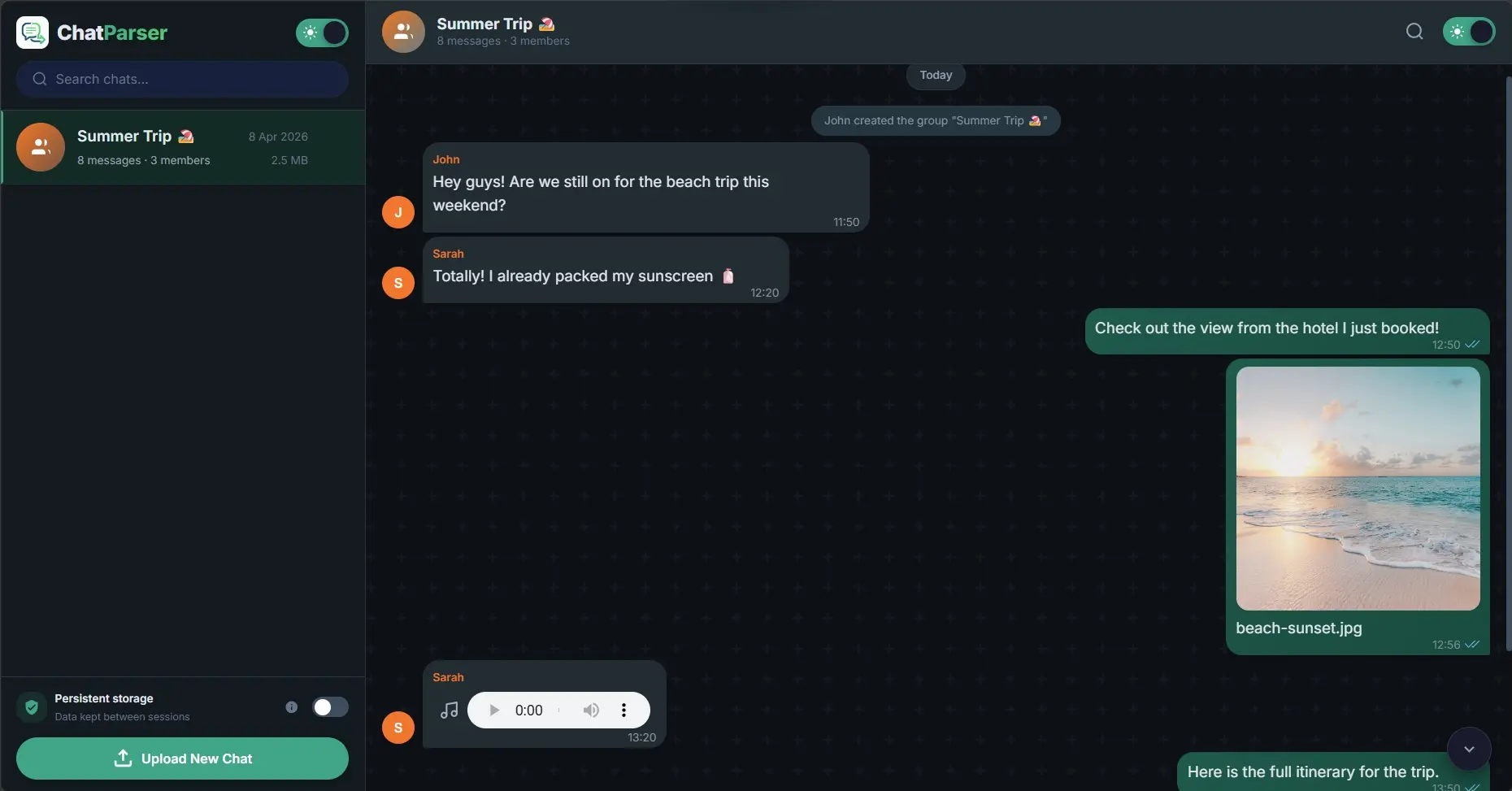
ChatParser was created specifically to solve this problem. Instead of forcing users to deal with messy text files, it transforms exported WhatsApp chats into a clean, structured, and interactive format.
The main goal of ChatParser is to recreate the original chat experience while improving readability and usability.
When you use ChatParser, it:
- converts raw text into realistic chat bubbles
- rebuilds the conversation layout
- organizes messages by date and time
- makes the entire chat searchable
This transformation turns a boring and unreadable file into something that feels familiar and enjoyable. Instead of struggling to read lines of text, you can scroll through your chats just like you would inside WhatsApp.
Privacy First: Zero-Server Architecture
One of the most important features of ChatParser is its strong focus on privacy. Many online tools require you to upload your files to external servers, which can be risky when dealing with personal conversations. ChatParser takes a completely different approach.
It uses a zero-server architecture, which means:
- your chat files never leave your device
- everything runs locally in your browser
- no data is uploaded or stored externally
Technologies such as IndexedDB and modern browser APIs handle all processing directly on your device.
This ensures:
- complete privacy
- no tracking
- full control over your data
You can safely view your chats without worrying about security or data leaks.
Key Features Explained in Simple Terms
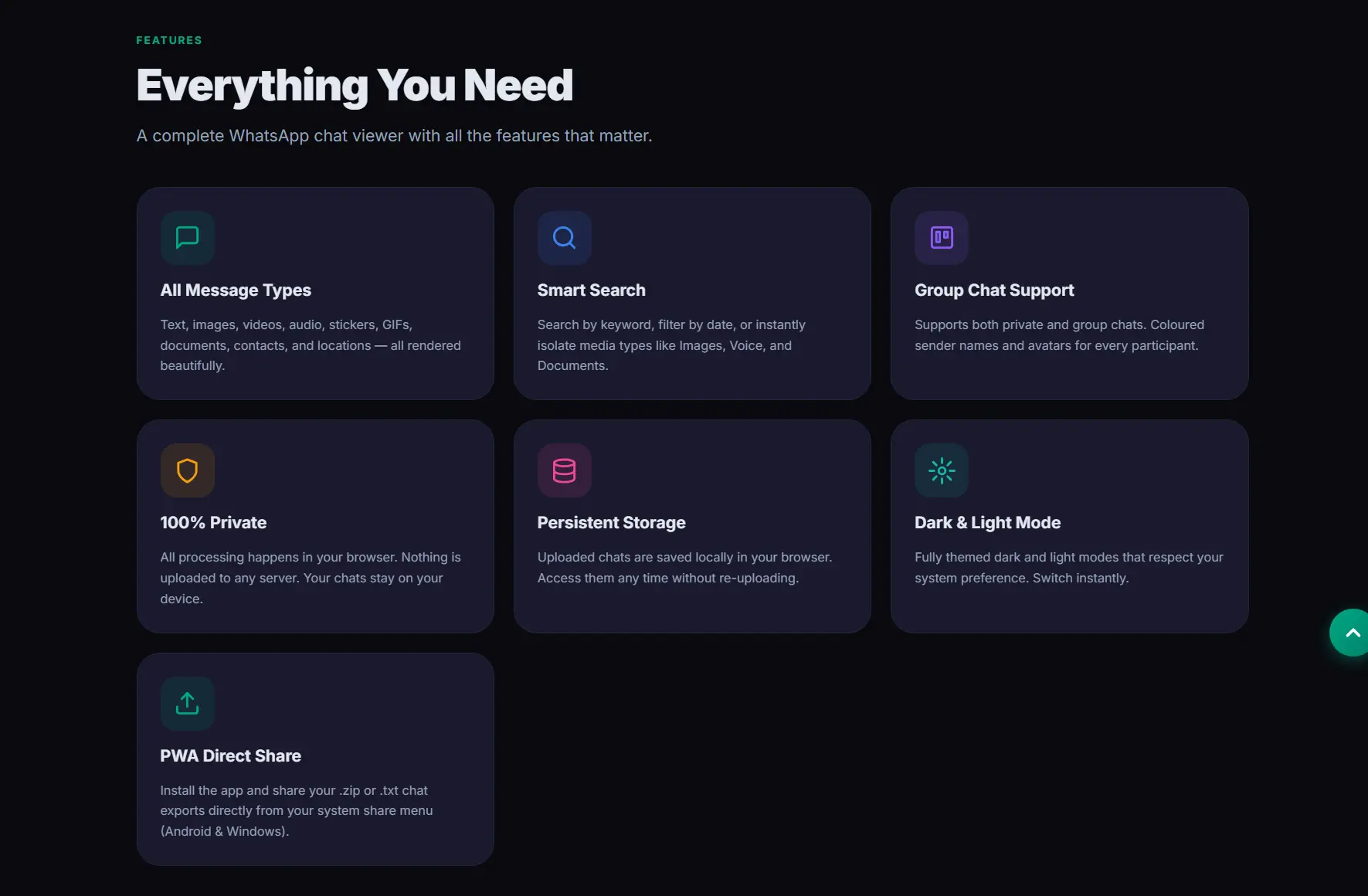
ChatParser is not just about viewing chats. It provides several powerful features that improve the entire experience.
The platform is designed to be fast, secure, and user-friendly, even when handling large chat files.
It offers full privacy by keeping all data inside your browser, ensuring that nothing is shared online. This makes it ideal for users who value confidentiality.
Performance is another strong point. ChatParser can handle extremely large chats, even those containing more than 500,000 messages. It uses advanced techniques such as virtualization to load messages efficiently, ensuring smooth scrolling and fast performance without lag.
Media support is fully integrated. Instead of separating files, ChatParser displays images, videos, voice notes, and documents directly within the conversation. This restores the natural flow of the chat.
The search feature allows you to quickly find messages using keywords, dates, or message types. For example, typing a word like “meeting” instantly shows relevant messages from across the entire chat history.
The platform also includes dynamic themes. Users can switch between light mode and dark mode, and it can automatically adjust based on system settings.
Additionally, ChatParser works as a Progressive Web App. This means you can install it on your device and use it like a native application on both desktop and mobile.
Step-by-Step Guide to Using ChatParser
Using ChatParser is simple and does not require any technical knowledge.
First, you need to export your chat from WhatsApp. Open the conversation, go to the options menu, and select the export chat feature. You can choose whether to include media files or not.
Next, save the exported file. You can send it to your email or store it directly on your device. If the file is in ZIP format, extract it before proceeding.
Then, open your web browser and visit the ChatParser website at.
Once the page loads, you can upload your chat file or simply drag and drop it into the interface.
Within seconds, ChatParser processes the file and displays your conversation in a clean and organized format. Messages appear as chat bubbles, media files are properly integrated, and scrolling becomes smooth and intuitive.
The experience feels almost identical to using WhatsApp itself.
Why ChatParser Matters
ChatParser is more than just a viewing tool. It significantly improves how you interact with your chat history.
Reading becomes much easier because the content is structured and visually organized. You no longer have to struggle with raw text files.
Searching becomes fast and efficient. Instead of scrolling endlessly, you can find specific messages instantly.
Sharing is also improved. You can take clean screenshots of conversations for professional use, legal purposes, or personal sharing.
Most importantly, it restores the emotional value of conversations. Seeing messages in a familiar chat format helps bring back memories, context, and feelings that are lost in plain text files.
Conclusion
Exporting WhatsApp chats is essential for backup and data safety. However, the default exported files are not designed for human readability.
ChatParser solves this problem by transforming raw chat data into a clean, interactive, and user-friendly format.
It provides:
- a familiar chat interface
- powerful search capabilities
- full privacy with no uploads
- smooth and fast performance
All of this happens directly in your browser, without sending your data anywhere. If you want a better way to read, manage, and relive your WhatsApp conversations, ChatParser is the ideal solution.
Sources - whatsapp.com, chatparser.online, web.dev