How to Identify Intel CPU Generations and Understand Model Numbers
Learn how to read Intel CPU model numbers. We explain the difference between the old Core i series, the new Core series, and the Core Ultra processors.

 English
 Russian
 Español
 Français
 Deutsch
 हिन्दी
 සිංහල
සිංහල 中文
中文 日本語
日本語
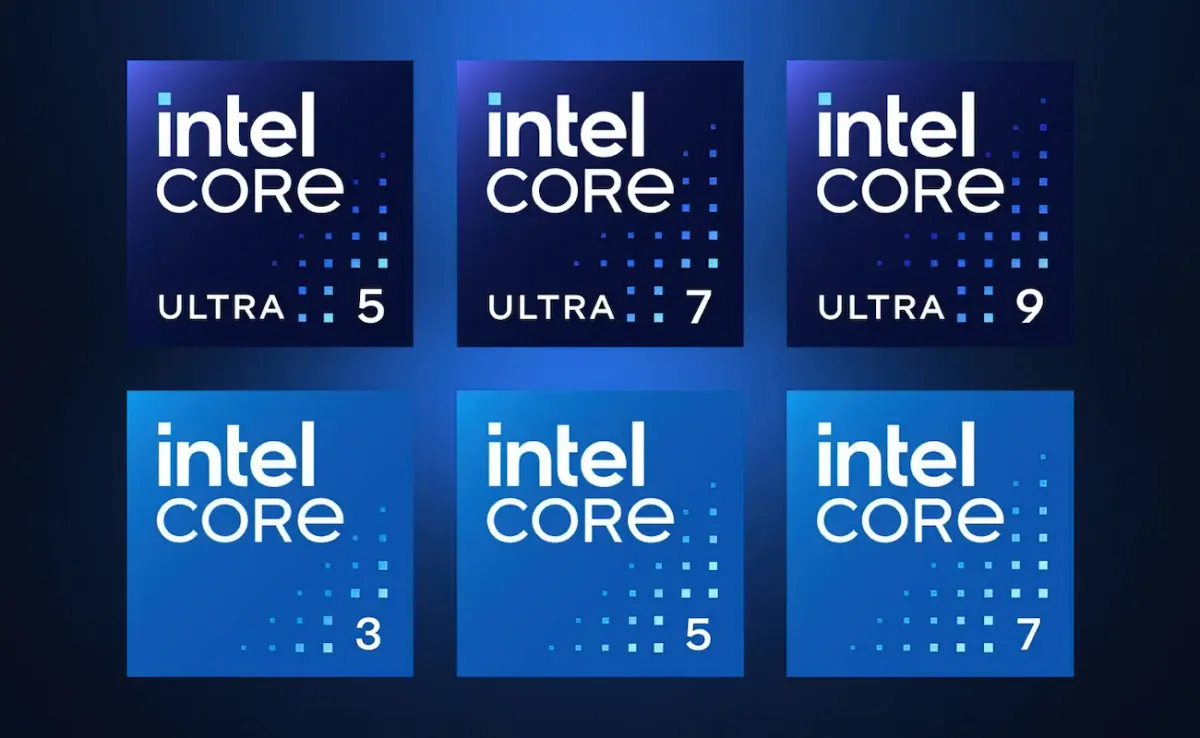
Buying a new computer or upgrading a processor can feel like trying to crack a secret code. You see long strings of numbers and letters like i7-13700K, Core Ultra 7 155H, or Core 5 120U. If you do not know what these characters mean, you might end up buying a laptop that is older than you think or paying extra for features you will never use. Understanding Intel's naming scheme is the best way to ensure you get exactly what you pay for.
For over a decade, Intel stuck to a fairly consistent naming pattern known as the "Core i" series. However, in recent years, they introduced a major rebranding. Now, shoppers have to navigate three distinct buckets: the legacy Core i series, the new mainstream Core series, and the premium Core Ultra series. This guide will break down exactly how to read these names so you can identify the generation, performance level, and intended use of any Intel processor instantly.
The Legacy Standard: Intel Core i Series (Gen 1 to Gen 14)
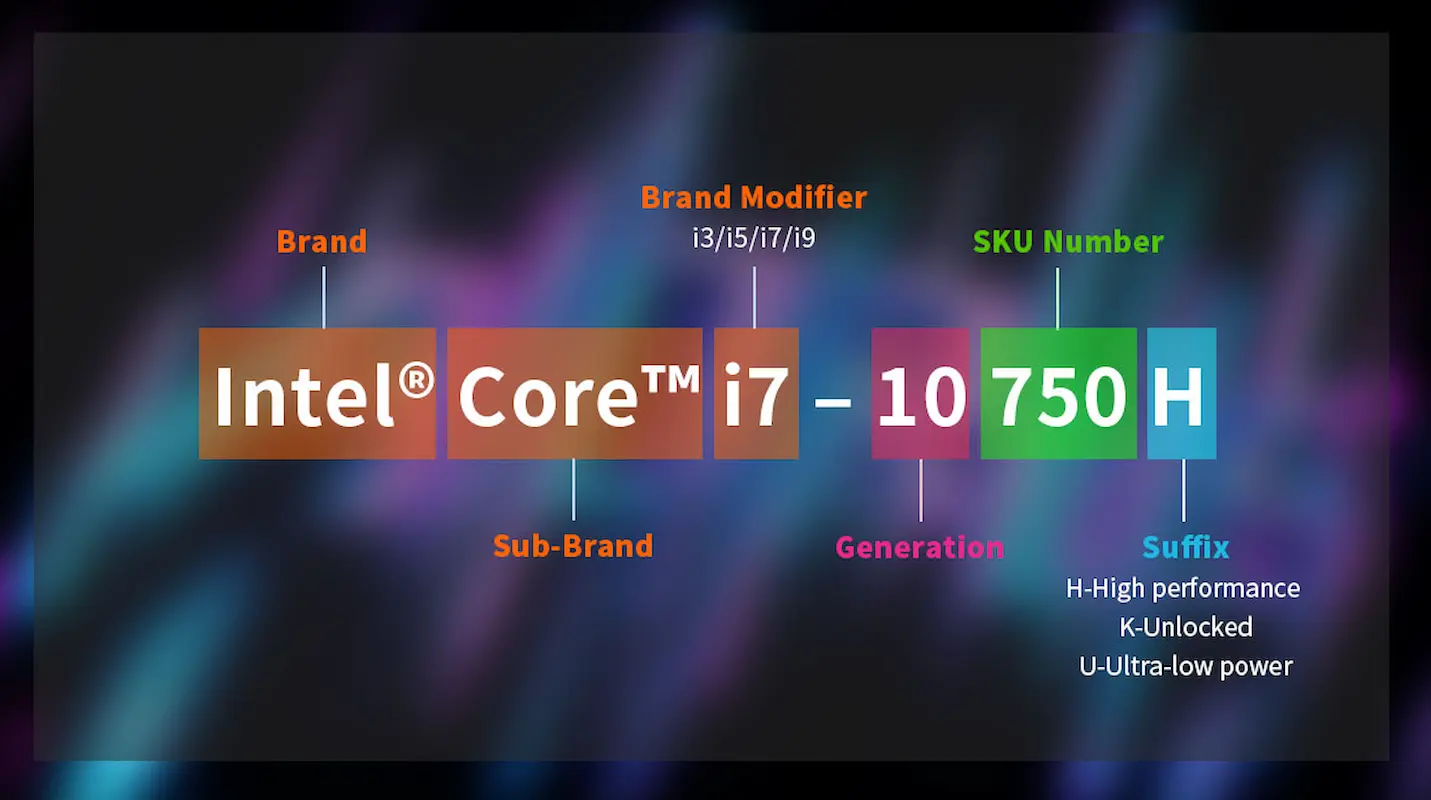
For most people, the "Core i" branding is what comes to mind when they think of Intel. This system was used from the very first generation up until the 14th generation in 2023 and 2024. Even though Intel has moved to new names, millions of computers on the market still use this convention.
The structure is broken down into four parts: the Brand, the Brand Modifier, the Generation Indicator, and the Suffix. Let us look at an example: Intel Core i7-13700K.
First, you have the Brand Modifier, which is the "i7" part. This tells you the general performance tier.
- i3: Entry-level performance for basic office work and browsing.
- i5: Mid-range performance, great for gaming and multitasking.
- i7: High-end performance for heavy content creation and intense gaming.
- i9: Enthusiast-level performance for extreme workloads.
Next is the Generation Indicator. This is the most important part for determining the age of the chip. It is the number immediately following the hyphen. In our example, i7-13700K, the number "13" tells you this is a 13th Generation processor. If the number was i7-12700K, it would be 12th Gen. For older processors with only three digits after the hyphen (like i7-960), the first digit indicates the generation (9th Gen).
Finally, the last three digits are the SKU (Stock Keeping Unit), which usually indicates clock speed ranking within that specific family. A higher number is generally faster.
The New Mainstream: Intel Core Series (Tier 1)
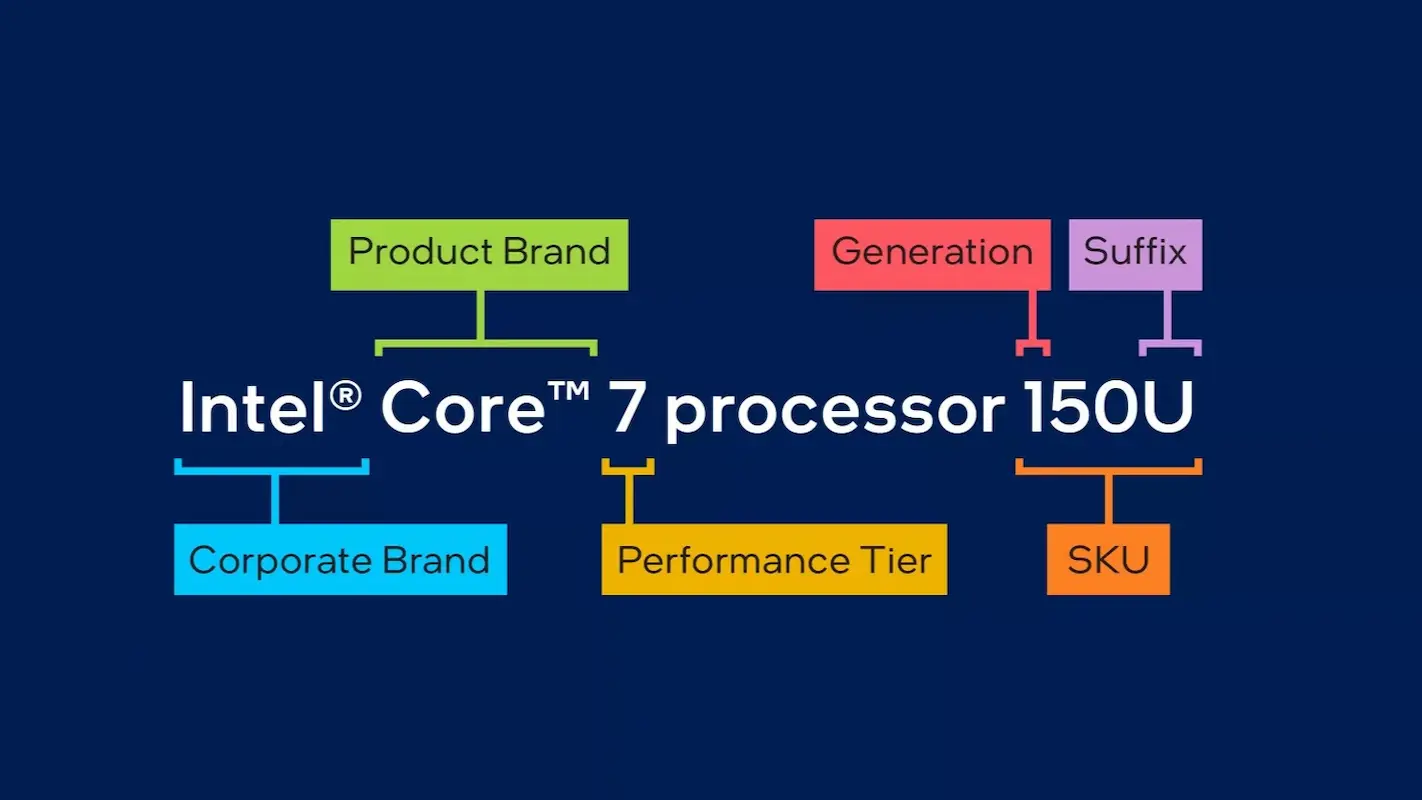
Starting in 2024, Intel decided to simplify their branding. They dropped the iconic "i" from the name. This marked the beginning of a new era. The first category in this new system is simply called Intel Core.
This category is designed for mainstream users. These processors are generally essentially refreshed versions of older technology (often Raptor Lake architecture) packaged for budget-friendly and mid-range laptops. If you see a laptop sticker that says "Intel Core 5" without the word "Ultra," you are looking at this tier.
The naming structure looks like this: Intel Core 5 processor 120U.
- Brand: Intel Core (no "i").
- Level: 3, 5, or 7. There is typically no "9" in this mainstream tier.
- Processor Number: The first digit in the number (like the "1" in 120U) indicates the series generation. Since this is the first iteration of the new branding, it starts with Series 1.
- Suffix: The letter at the end still tells you the power usage, which we will discuss later.
It is vital to understand that the "Intel Core" series (without Ultra) sits below the premium tier. It is perfect for students, home office users, and general consumers who do not need advanced AI capabilities or top-tier gaming performance.
The Premium Powerhouse: Intel Core Ultra Series
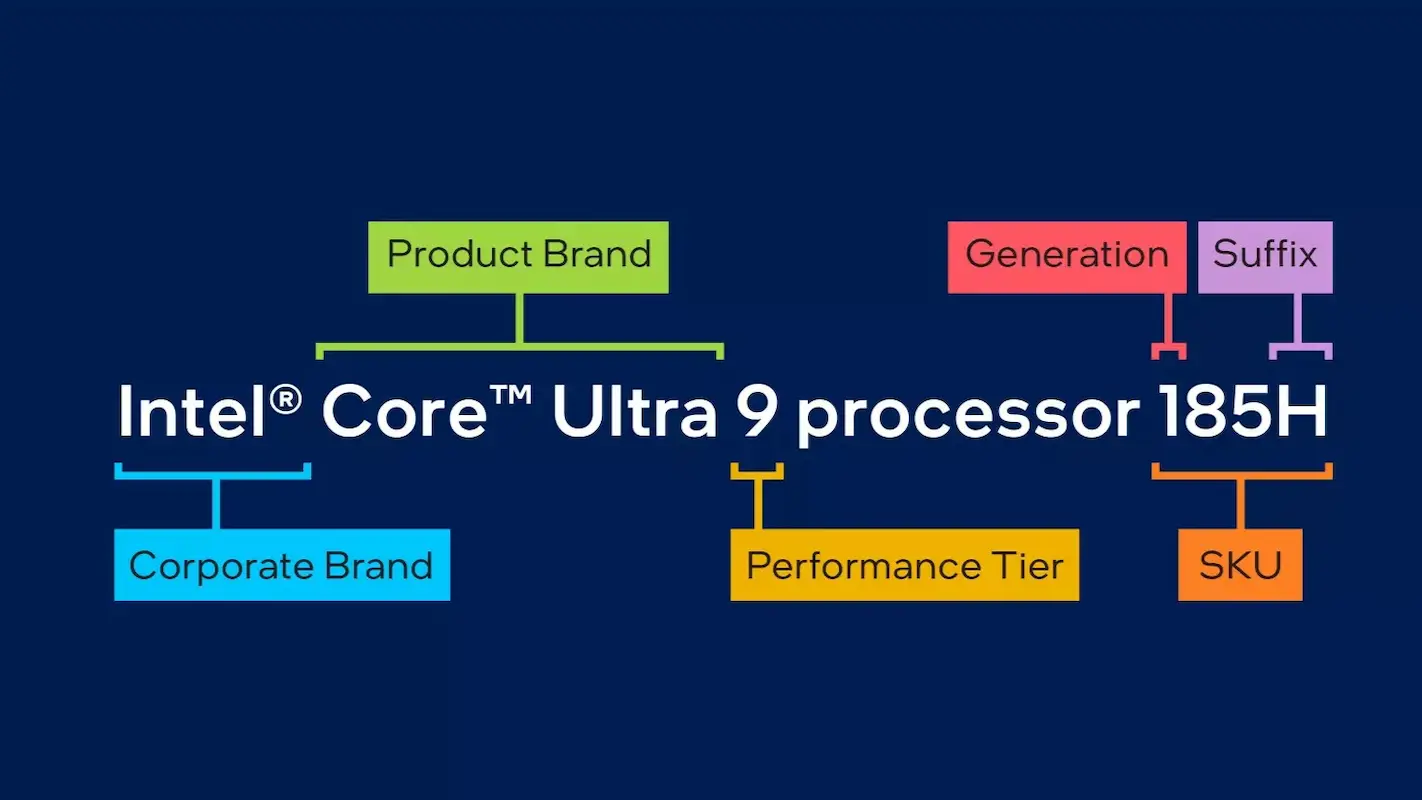
The biggest change in Intel's history is the introduction of the Intel Core Ultra brand. These processors represent Intel's latest and greatest technology, featuring new architectures (like Meteor Lake and Lunar Lake) and dedicated hardware for Artificial Intelligence called NPUs (Neural Processing Units).
If you are a gamer, a video editor, or someone who wants a future-proof laptop, this is the series you should look for. The naming convention is similar to the mainstream version but adds the word "Ultra."
Example: Intel Core Ultra 7 processor 155H.
- Brand: Intel Core Ultra.
- Level: Ultra 5, Ultra 7, or Ultra 9.
- Series Generation: This is where it gets slightly tricky. The first digit usually indicates the series. In "155H", the "1" stands for Series 1. If you see a newer chip like the "256V", the "2" indicates Series 2 (Lunar Lake).
- SKU: The second and third digits (like "55") indicate the relative speed within that specific tier.
The "Ultra" name signifies that the chip uses 3D hybrid architecture and advanced power efficiency methods. If you see "Ultra" on the box, you are getting the premium silicon.
Decoding the Letter Suffixes
Regardless of whether you are looking at an old i7, a new Core 5, or a Core Ultra 9, the letter at the very end of the model number is critical. This letter tells you the thermal profile and intended use case of the CPU. If you ignore this, you might accidentally buy a slow laptop when you wanted a fast one, or a battery-draining gaming laptop when you wanted a travel companion.
- U (Ultra-Low Power): Found in thin and light laptops. These prioritize battery life over raw speed. Great for travel and office work.
- H (High Performance Graphics): Found in gaming laptops and creator workstations. These consume more power and run hotter but offer much better performance.
- HX (Extreme Performance): These are essentially desktop-class processors stuffed into a laptop chassis. They offer maximum speed but require bulky cooling and have poor battery life.
- K (Unlocked): Found only on desktop PCs. This means the processor can be "overclocked" to run faster than factory settings.
- F (Requires Discrete Graphics): This means the CPU does not have built-in graphics. You must have a dedicated graphics card (GPU) for the screen to work.
- V (Lunar Lake Exclusive): A newer suffix for Series 2 Ultra chips, indicating high efficiency and integrated memory for thin flagship laptops.
How to choose the Right One for You
Now that you know how to read the numbers, how do you choose?
If you are on a strict budget or buying a refurbished machine, the Core i Series (Gen 12, 13, or 14) is still excellent. Look for an i5 or i7. Avoid anything older than Gen 12 if you want the computer to last a few years.
If you are buying a standard new laptop for school or basic work, the Intel Core (Series 1) is a solid choice. A "Core 5" will handle almost any daily task you throw at it.
If you are a professional, a creator, or a tech enthusiast who wants AI features and the best battery efficiency, go for the Intel Core Ultra. An "Ultra 7" is the sweet spot for high performance without the extreme price of the Ultra 9.
By reading the label carefully checking the brand, the generation number, and the suffix you can instantly tell if a computer is a good deal or outdated inventory.
Source - intel.com , tomshardware.com , pcworld.com
Frequently Asked Questions