What Is Shared GPU Memory and How Does It Work?
Learn exactly what shared GPU memory is in Windows. Discover how it acts as a backup for your graphics card, how it affects gaming FPS, and why it is important.

 English
 Russian
 Español
 Français
 Deutsch
 हिन्दी
 සිංහල
සිංහල 中文
中文 日本語
日本語
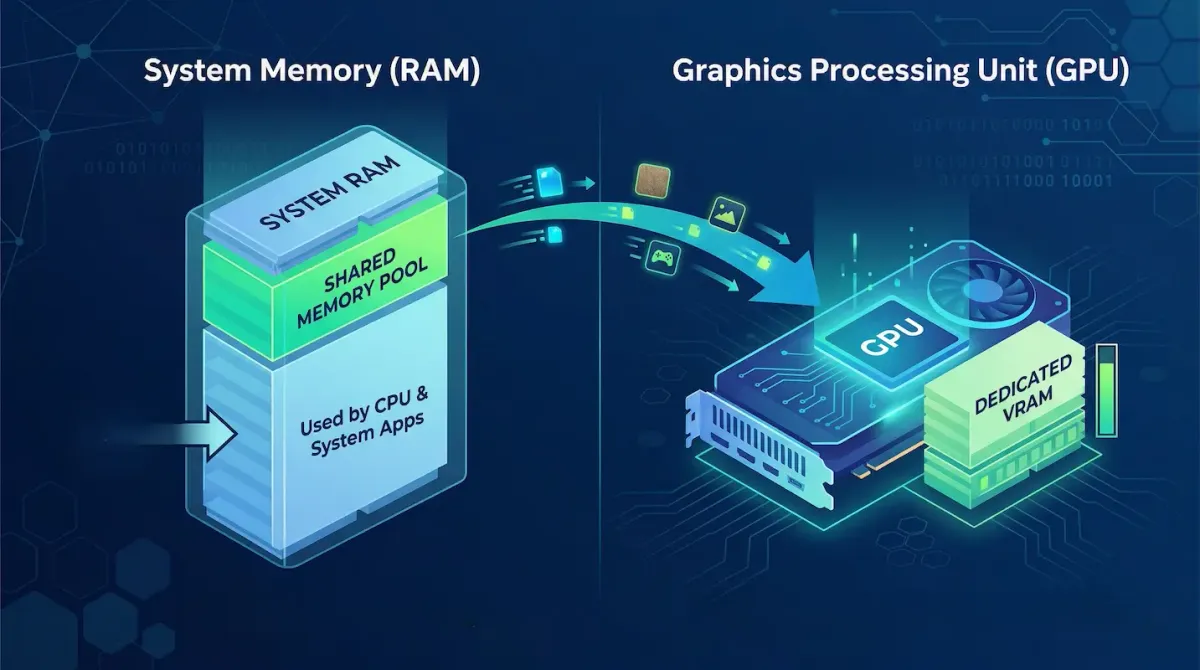
If you open Task Manager on your Windows computer and navigate to the Performance tab, you will likely see a section labeled Shared GPU Memory. For many users, this raises immediate questions. What exactly does this mean? Is it beneficial for performance? Can it improve gaming speed?
The short answer is that shared GPU memory is not designed to boost performance. Instead, it is a smart safety mechanism built into your operating system. In this detailed guide, you will learn what shared GPU memory is, how it works, and how it affects your computer’s performance in real-world scenarios.
Understanding RAM and VRAM
To fully understand shared GPU memory, you first need to understand the difference between RAM and VRAM, because shared memory is directly connected to both.
RAM, or Random Access Memory, is the main memory used by your computer’s CPU. It temporarily stores data for active applications, your operating system, and background tasks. For example, when you open multiple browser tabs or run software, your system uses RAM to keep everything running smoothly.
VRAM, or Video RAM, is a special type of memory built directly into your graphics card. It is designed specifically for handling visual data such as textures, 3D models, lighting effects, and frame buffers. Because VRAM is physically located very close to the GPU, it can process graphics data extremely fast.
This speed difference is very important. VRAM is optimized for graphics performance, while system RAM is more general-purpose and slower for visual workloads.
What Is Shared GPU Memory?
Shared GPU memory is a portion of your system’s RAM that your operating system allows the GPU to use when necessary.
Think of it as an emergency backup.
When your GPU is running a heavy application like a modern video game or video editing software, it stores all visual data in VRAM. However, if the VRAM becomes completely full, the system does not immediately crash. Instead, Windows allows the GPU to borrow some of the system RAM.
This borrowed memory is called shared GPU memory.
In simple terms:
- VRAM is the primary, high-speed memory
- Shared memory is a slower backup from system RAM
This system prevents crashes and allows applications to continue running even when memory demands exceed the GPU’s limits.
How Windows Allocates Shared Memory
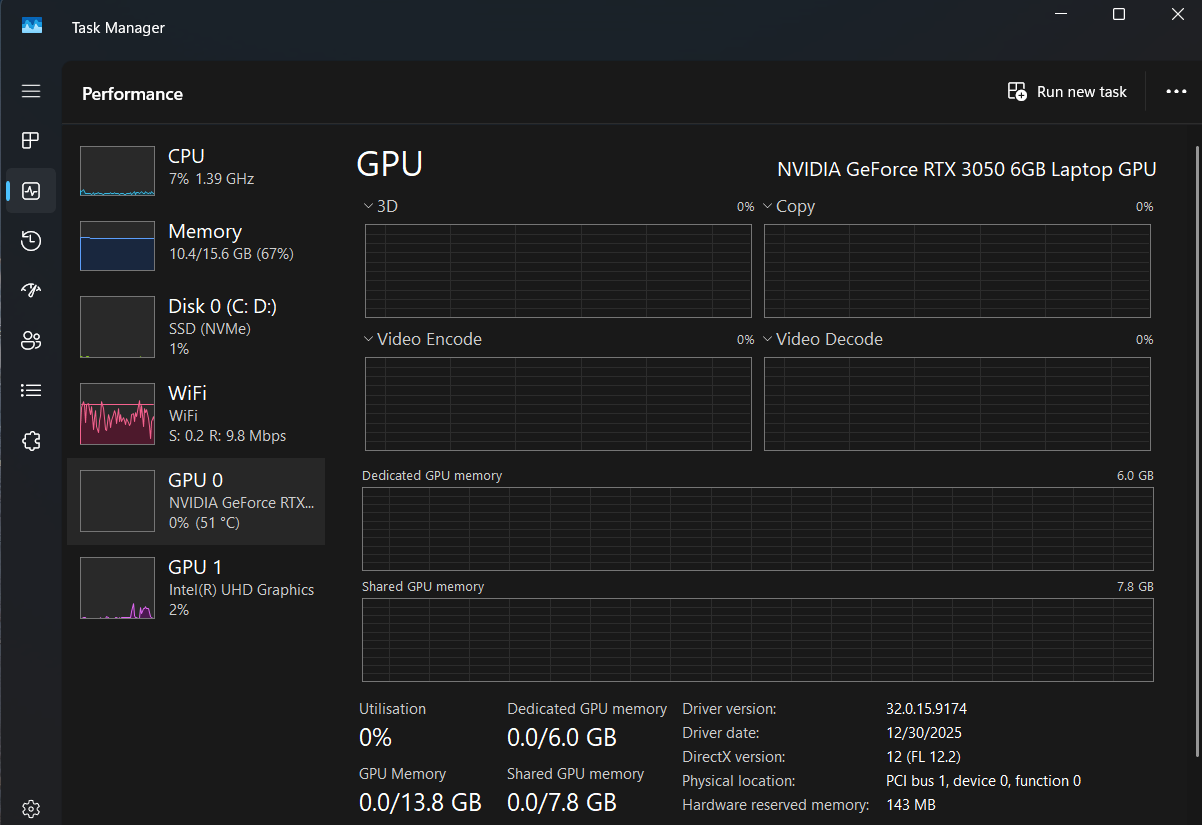
Windows automatically controls shared GPU memory, so users usually do not need to configure anything manually. In most cases, Windows allows the GPU to use up to 50 percent of your total system RAM as shared memory.
For example, if your system has 16GB of RAM, up to 8GB can be used as shared GPU memory. If you upgrade to 32GB, the shared limit increases to 16GB.
However, it is very important to understand that this memory is not permanently reserved. It is only used when required. When your GPU does not need it, your system can still use the full RAM for normal tasks.
Does Shared GPU Memory Improve Performance?
A common misunderstanding is that more shared GPU memory means better performance. In reality, the opposite is true. Shared GPU memory is significantly slower than dedicated VRAM.
This is because:
- VRAM is located directly on the graphics card
- System RAM is located on the motherboard
- Data must travel a longer path between GPU and RAM
When your GPU starts using shared memory, performance usually decreases. You may notice:
- lower frame rates
- input lag
- stuttering during gameplay
So while shared memory helps prevent crashes, it is not a performance feature.
Integrated Graphics vs Dedicated Graphics
The importance of shared memory depends heavily on your system’s GPU type. Integrated graphics are built into the CPU and do not have their own VRAM. Because of this, they rely entirely on shared system memory. This is why devices with integrated graphics struggle with demanding games and graphics-intensive applications.
Dedicated graphics cards, on the other hand, come with their own VRAM. These GPUs are designed to handle heavy workloads efficiently. Shared memory is only used as a fallback when VRAM is fully utilized.
If you have a dedicated GPU, your system will try to avoid using shared memory as much as possible.
Can You Disable Shared GPU Memory?
Many users wonder if they can disable shared GPU memory to improve performance. In most cases, this is not recommended. Windows manages memory allocation automatically to maintain system stability. If shared memory is disabled, your system may:
- crash when VRAM is full
- freeze during heavy workloads
- become unstable
On some systems with integrated graphics, you may be able to adjust memory allocation in the BIOS. However, for systems with dedicated GPUs, this feature is controlled entirely by the operating system.
How to Avoid Using Shared Memory
If you want the best performance, your goal should be to avoid using shared memory altogether. This means staying within your GPU’s VRAM limits. You can achieve this by adjusting your graphics settings carefully.
Lowering texture quality is one of the most effective methods. High-resolution textures consume large amounts of VRAM. Reducing texture settings frees up memory and improves performance.
Reducing screen resolution also helps significantly. Playing at 4K requires much more memory than 1080p. Lowering resolution reduces the workload on your GPU.
Adjusting other graphics settings such as shadows, reflections, and effects can further reduce VRAM usage.
By optimizing these settings, you can prevent your GPU from relying on slower shared memory.
Why Shared GPU Memory Exists
Shared GPU memory exists to improve system reliability. Without it, applications would crash immediately when VRAM is full. This could result in lost progress, system errors, or even crashes during important tasks.
With shared memory, your system can continue running, even under heavy load. While performance may decrease, stability is maintained. This design ensures a better user experience overall.
Conclusion
Shared GPU memory is not designed to improve performance. Instead, it acts as a safety net that allows your GPU to continue functioning when its dedicated VRAM is fully used.
Although it helps prevent crashes, it comes at the cost of reduced performance due to slower data transfer speeds. For the best experience, you should aim to stay within your GPU’s VRAM limits by adjusting your graphics settings.
Understanding shared GPU memory allows you to make smarter decisions when optimizing your system for gaming and heavy workloads.
Sources - microsoft.com, cgdirector.com, liquidweb.com
Frequently Asked Questions