What Is CPU Scheduling in an Operating System?
Learn exactly what CPU scheduling is in an operating system. This simple guide explains how your computer multitasks, including Round Robin and FCFS methods.


 English
 Russian
 Español
 Français
 Deutsch
 हिन्दी
 සිංහල
සිංහල 中文
中文 日本語
日本語

Have you ever noticed that your computer can play music, download files, and let you type a document at the same time? It may seem like the computer is performing many tasks simultaneously. In reality, most computers have a CPU that can only execute one instruction at a time. The illusion of multitasking is created by a system that quickly switches the CPU between different programs.
This system is called CPU scheduling.
CPU scheduling is a core function of an operating system. It determines which program gets access to the processor and how long that program can run before another one takes its place. In this guide, we will explore what CPU scheduling means, why it is important, and the common algorithms used to manage tasks inside an operating system.
What CPU Scheduling Means
The Central Processing Unit (CPU) is the main processor that performs calculations and executes program instructions. At any moment, many applications may request access to the CPU.
Since the CPU cannot run all programs at once, the operating system must organize these requests. It does this by placing processes into a queue and deciding which one should run next.
This decision making process is called CPU scheduling.
The operating system rapidly switches the CPU between processes. Because this switching happens thousands of times per second, it appears as though all applications are running simultaneously.
Goals of CPU Scheduling
The scheduling mechanism in an operating system is designed to achieve several important goals. Think of it like a traffic controller managing vehicles at a busy intersection. The goal is to keep traffic flowing smoothly without delays or accidents.
Some key goals include:
- High CPU utilization – Keeping the processor active as much as possible so system resources are not wasted.
- Fairness – Ensuring every process receives a chance to use the CPU.
- High throughput – Completing as many tasks as possible within a given time period.
- Low waiting time – Reducing how long processes must wait before execution begins.
- Fast response time – Allowing interactive programs to respond quickly when users perform actions.
When these goals are balanced properly, the computer feels fast and responsive.
Important Terms in CPU Scheduling
To understand scheduling algorithms, it helps to know several important terms commonly used in operating system discussions.
| Term | Definition |
|---|---|
| Arrival Time | The moment when a process enters the ready queue and requests CPU access. |
| Burst Time | The amount of time a process needs to use the CPU to complete its task. |
| Waiting Time | The total time a process spends in the queue before it gets CPU access. |
| Turnaround Time | The total time required for a process to complete execution. |
Turnaround Time = Completion Time – Arrival Time
These measurements help operating systems evaluate how efficient a scheduling algorithm is.
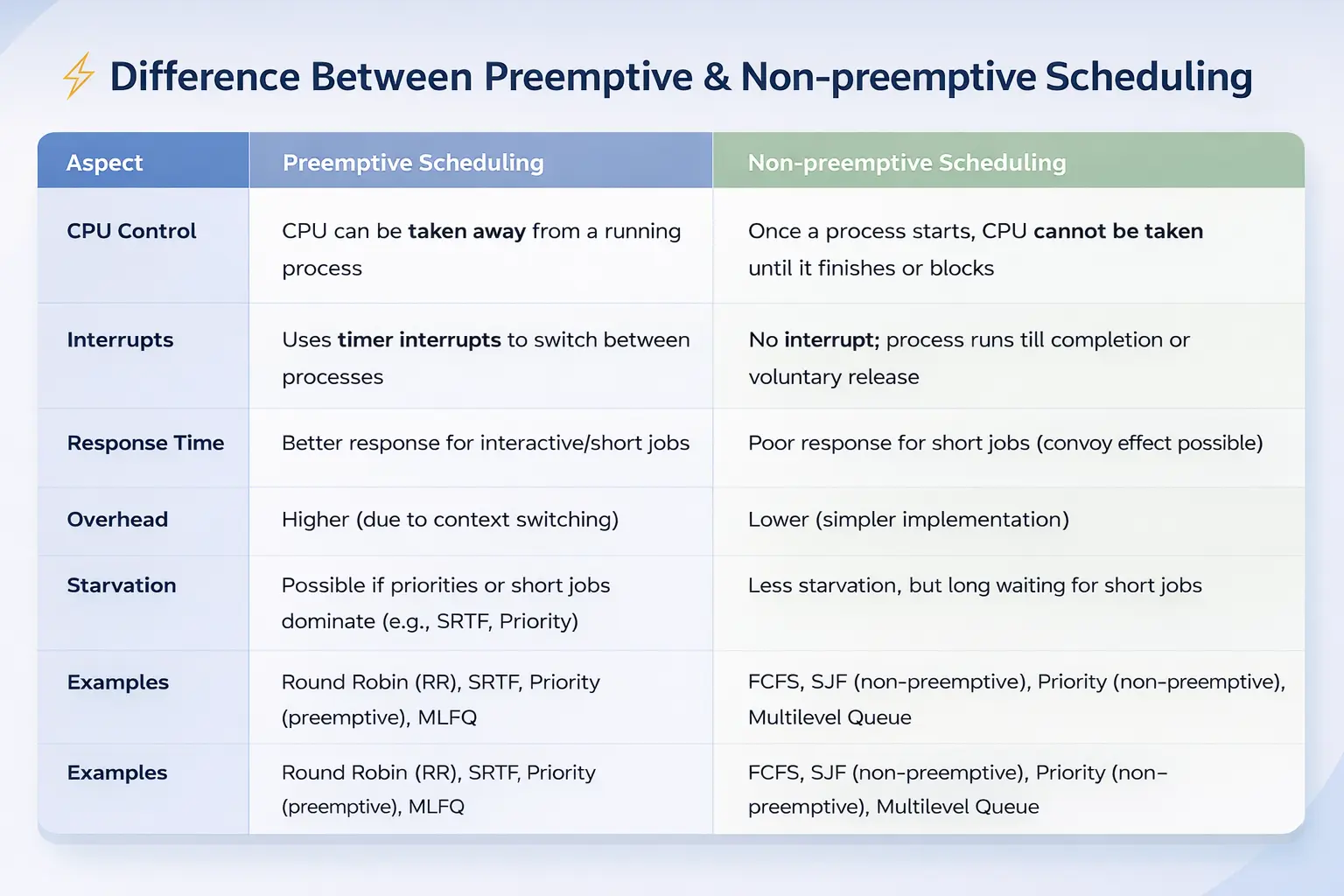
Preemptive vs Non Preemptive Scheduling
CPU scheduling strategies fall into two main categories depending on how much control the operating system has over running processes.
Non Preemptive Scheduling
In non preemptive scheduling, once a process receives the CPU, it keeps control until it finishes execution or voluntarily releases the processor.
The operating system cannot interrupt the process.
This approach is simple but can cause delays if a long running process occupies the CPU while other shorter tasks are waiting.
Preemptive Scheduling
Modern operating systems use preemptive scheduling.
In this method, the operating system can interrupt a running process and assign the CPU to another process. This prevents one program from monopolizing the processor.
Preemptive scheduling improves responsiveness, especially in systems where many programs run simultaneously.
You can learn more about process scheduling concepts in resources such as the explanation of CPU scheduling.
Common CPU Scheduling Algorithms
Over time, computer scientists have developed several algorithms to determine how the CPU should be assigned to processes. Each algorithm has advantages and disadvantages depending on the situation.
First Come First Serve (FCFS)
The First Come First Serve algorithm works similarly to a queue at a store checkout.
The first process that arrives in the ready queue receives the CPU first. Once that process finishes, the next process in line runs.
Although this method is simple, it can create a problem called the convoy effect, where short tasks must wait behind long tasks, slowing down the system.
Shortest Job Next (SJN)
The Shortest Job Next algorithm selects the process with the smallest burst time.
This approach reduces average waiting time because short tasks finish quickly.
However, the main difficulty is that the operating system must estimate how long each process will take to run, which is not always accurate.
Round Robin Scheduling
Round Robin is one of the most widely used scheduling algorithms in interactive operating systems.
Each process receives a fixed time interval called a time quantum.
For example, the CPU might allow a process to run for 10 milliseconds. If the process is not finished when its time expires, the operating system pauses it and places it at the end of the queue. The next process then receives the CPU.
Because this switching happens very quickly, all programs appear to run smoothly at the same time.
Priority Scheduling
In Priority Scheduling, each process is assigned a priority level.
Processes with higher priority are executed before those with lower priority. Critical system processes typically receive higher priority than background tasks.
One issue with this method is starvation, where low priority processes may never receive CPU time.
To solve this problem, systems often use aging, which gradually increases the priority of processes that have been waiting for a long time.
A detailed explanation of these algorithms can also be found in the overview of process scheduling.
Why CPU Scheduling Is Important
CPU scheduling is essential for maintaining the performance and responsiveness of modern operating systems.
Without effective scheduling, computers would struggle to manage multiple programs at the same time. Tasks might freeze, applications could become unresponsive, and system performance would drop significantly.
For example, when you type on a keyboard, the operating system must quickly schedule the process responsible for displaying characters on the screen. If the CPU is occupied by a large background task and cannot switch quickly, the system may appear frozen.
Efficient scheduling ensures that both background processes and user interactions run smoothly.
Conclusion
CPU scheduling is a critical mechanism that allows operating systems to manage multiple processes efficiently. By determining which process should run at any given moment, the scheduler ensures that the CPU is used effectively and that applications remain responsive.
Through various scheduling algorithms such as First Come First Serve, Shortest Job Next, Round Robin, and Priority Scheduling, operating systems balance fairness, performance, and responsiveness.
Although users rarely notice it, CPU scheduling works continuously behind the scenes, enabling computers and smartphones to perform multiple tasks smoothly every day.
Sources - geeksforgeeks.org, tutorialspoint.com
Frequently Asked Questions