What Is a Network Socket? A Beginner Friendly Explanation
Learn exactly what a network socket is, how it connects computers across the internet, and the difference between TCP and UDP sockets in simple English.


 English
 Russian
 Español
 Français
 Deutsch
 हिन्दी
 සිංහල
සිංහල 中文
中文 日本語
日本語
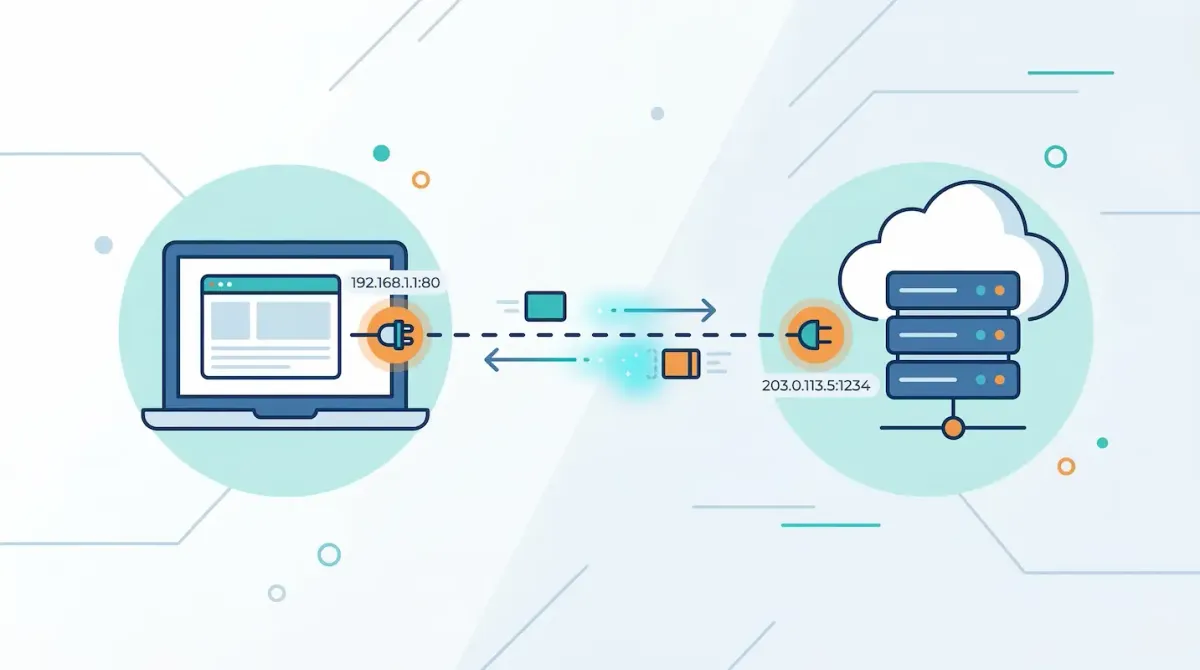
Whenever you open a website, send an email, stream a video, or play an online game, your device communicates with servers across the internet. These communications happen incredibly fast and often involve thousands of data exchanges within seconds. But how do different programs know where to send and receive the correct information?
The technology that makes this possible is called a network socket. Although the term may sound technical, the idea behind it is actually simple. In this guide, we will explain what a network socket is, how it works, and why it is essential for modern internet communication.
Understanding the Basic Concept
A network socket is a software mechanism that allows two applications to communicate with each other across a network.
Your computer does not use a single connection for all internet activity. If it did, you would only be able to run one online application at a time. Instead, the operating system creates many virtual communication channels that allow different programs to exchange data independently. Each of these communication channels is represented by a socket.
A socket is defined using two key pieces of information:
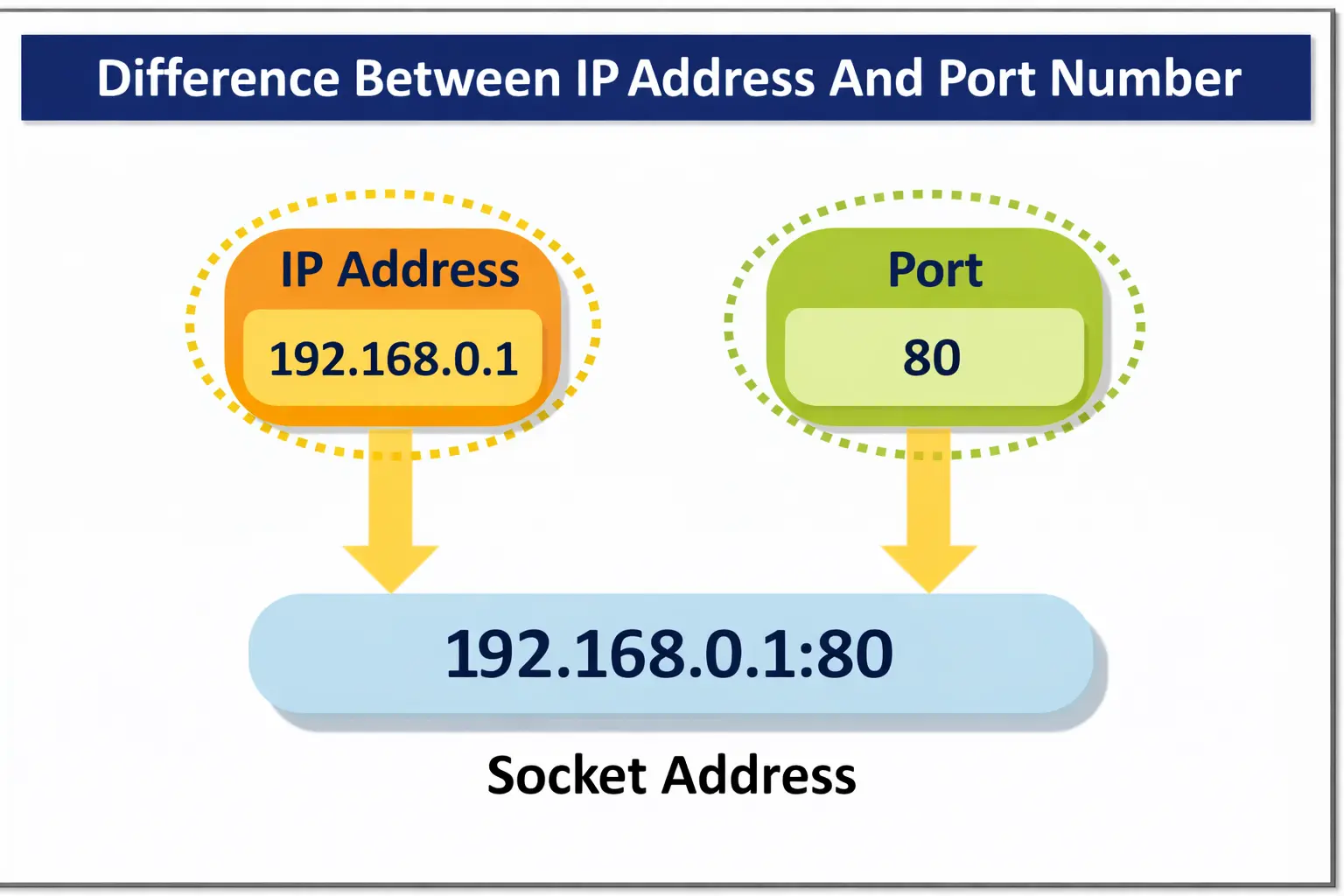
- IP Address – Identifies the specific device on the network.
- Port Number – Identifies the specific application or service on that device.
When an IP address and a port number are combined, they form a unique communication endpoint. This endpoint is what we call a network socket.
You can learn more about the underlying network concepts such as IP addresses and port numbers to understand how devices are identified on a network.
A Simple Real World Example
A helpful way to understand network sockets is to compare them to a telephone system.
Imagine calling a large company. The company's main phone number represents the IP address because it connects you to the company's main building.
However, once you reach the building, you still need to contact the correct department. You might enter an extension number to reach billing, technical support, or customer service. That extension number represents the port number.
When a specific employee answers your call and you start talking, that ongoing conversation is similar to a network socket connection.
Just as a large call center can manage thousands of phone calls at the same time using different extensions, a computer can manage thousands of socket connections simultaneously using different ports.
Why Network Sockets Are Important
You might wonder why computers need sockets instead of simply receiving data directly from the internet.
The main reason is organization.
Consider a situation where several applications are running on your computer at the same time:
- A web browser loading a news website
- A music streaming app playing songs
- A messaging app receiving chat messages
All of these programs are receiving data from the internet simultaneously. When data packets arrive at your device, the operating system must determine which application should receive them.
Sockets solve this problem. Each application opens its own socket connected to a specific port number. When incoming data arrives, the system checks the port number and sends the data to the correct program.
Without this system, your computer would not know where to send the incoming information, which could cause applications to malfunction or crash.
The Two Main Types of Network Sockets
Not all internet communication requires the same type of connection. Some applications prioritize reliability, while others prioritize speed. Because of this, developers use two main socket types.
Stream Sockets
Stream sockets are the most commonly used sockets. They rely on the Transmission Control Protocol (TCP). A stream socket creates a stable and reliable connection before data transmission begins. It ensures that data arrives in the correct order and without missing pieces. If any packet of data is lost during transmission, the system automatically requests it again. Because of their reliability, stream sockets are commonly used for:
- Loading websites
- Downloading files
- Sending emails
- Online transactions
You can read more about the Transmission Control Protocol to understand how reliable internet communication works.
Datagram Sockets
Datagram sockets use a different protocol called the User Datagram Protocol (UDP). Unlike TCP, UDP does not establish a formal connection before sending data. Instead, the sender simply transmits packets to the receiver without guaranteeing delivery or order. Although this approach is less reliable, it is much faster because it avoids the overhead of connection management. Datagram sockets are commonly used in situations where speed is more important than perfect accuracy, such as:
- Live video streaming
- Voice calls
- Online multiplayer games
If a small piece of data is lost in these situations, the system simply continues sending new information instead of resending old packets.
More details about UDP can be found in the explanation of the User Datagram Protocol.
How a Socket Connection Works
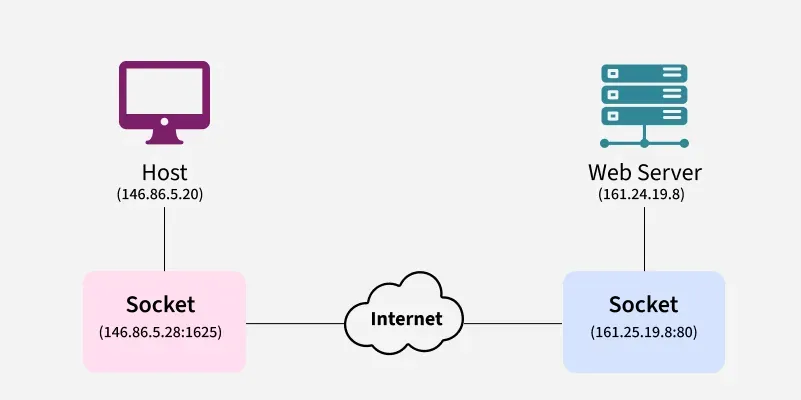
To understand how sockets operate in practice, let's look at what happens when you open a website.
First, the web server hosting the website creates a socket and sets it to listen for incoming connections. This means the server is ready to accept requests from users.
When you enter a website address into your browser, your computer creates its own client socket. This socket sends a connection request to the server.
If the server accepts the request, the connection is established. At this point, both devices can exchange data.
Your browser sends a request asking for the webpage, and the server responds by sending back the webpage's content such as text, images, and scripts.
When you close the webpage or leave the site, the connection is terminated. The sockets close, and the system resources are released so they can be used for other connections.
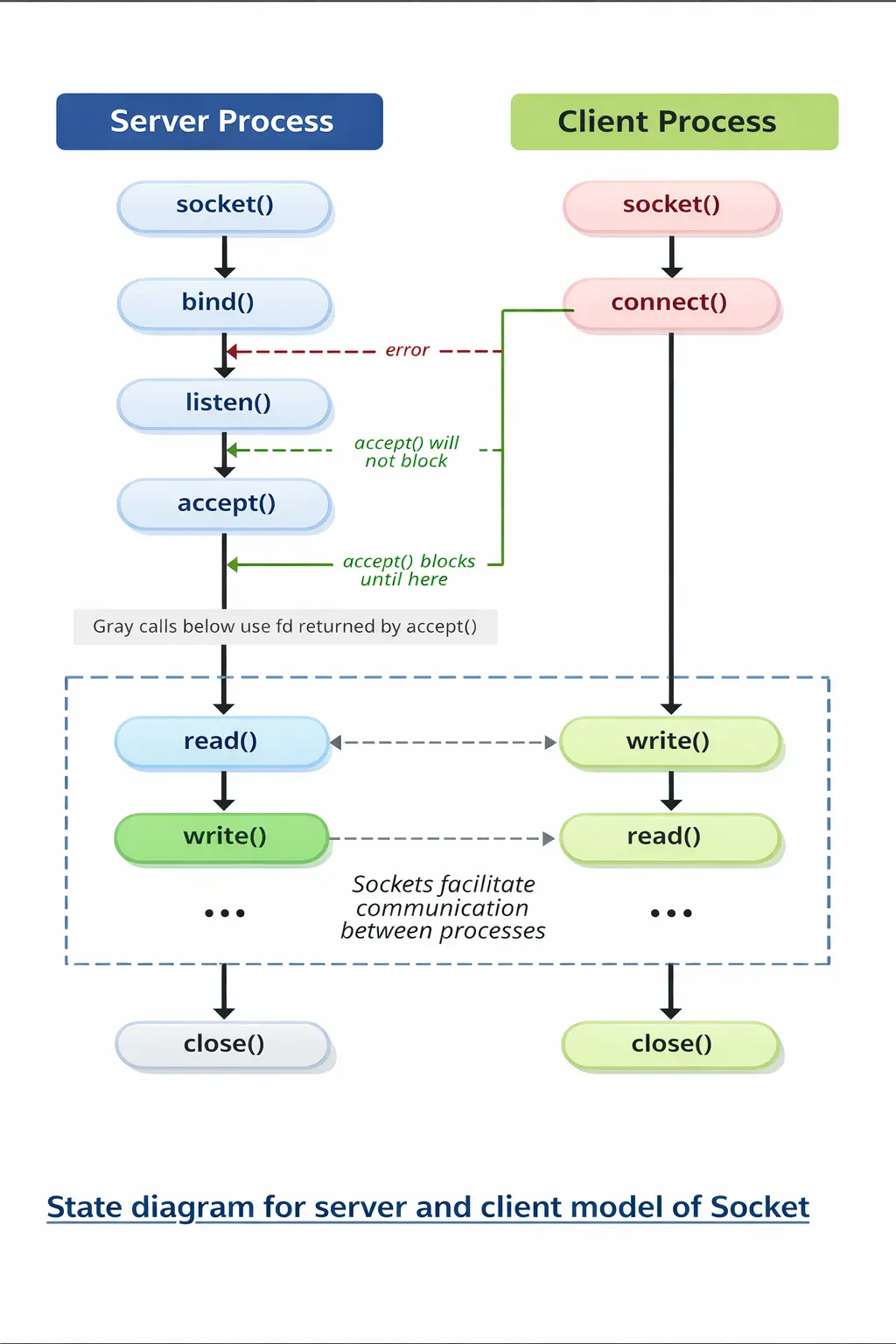
In a typical client–server socket communication process, the server first prepares itself to receive connections by creating a socket using socket(), assigning an IP address and port with bind(), and then waiting for clients by calling listen(). After that, the server executes accept(), which blocks (waits) until a client tries to connect. On the other side, the client creates its own socket using socket() and attempts to connect to the server using connect(). If the server is properly listening, the connection is established and accept() returns a new socket that both sides use to exchange data through read() and write() operations. However, if the client tries to connect when the server is not ready or not listening, the connection attempt results in an error. Once the communication is finished, both the client and server close the socket using close(), which terminates the connection and releases system resources.
| Process | Used By | Simple Meaning | Simple Example |
|---|---|---|---|
| socket() | Server & Client | Creates a communication endpoint that allows programs to communicate over a network. | Creating a phone device before making or receiving calls. |
| bind() | Server | Assigns an IP address and port number to the socket so clients know where to connect. | Giving the phone a phone number (e.g., port 8080). |
| listen() | Server | Puts the server in waiting mode so it can accept connection requests from clients. | Waiting for someone to call your phone. |
| accept() | Server | Accepts a connection request from a client and creates a new socket for communication. | Answering the phone when someone calls. |
| connect() | Client | Sends a connection request to the server’s IP address and port. | Dialing a phone number to call someone. |
| read() | Server & Client | Receives data sent from the other side of the connection. | Listening to what the other person says on the phone. |
| write() | Server & Client | Sends data to the other side of the connection. | Speaking to the other person during the call. |
| close() | Server & Client | Terminates the connection and releases resources. | Hanging up the phone after the conversation ends. |
Conclusion
Network sockets are a core component of how the internet works. They provide a structured way for applications to communicate across networks by combining an IP address with a port number to create a unique communication endpoint.
This system allows computers to handle many different network activities simultaneously while ensuring that each piece of data reaches the correct application.
Whether you are browsing the web, sending messages, streaming videos, or playing online games, network sockets are quietly working behind the scenes to keep the digital world connected.
Sources - wikipedia.org, cyberghostvpn.com, computerhope.com, geeksforgeeks.org
Frequently Asked Questions