English
 Russian
 Español
 Français
 Deutsch
 हिन्दी
 සිංහල
සිංහල 中文
中文 日本語
日本語
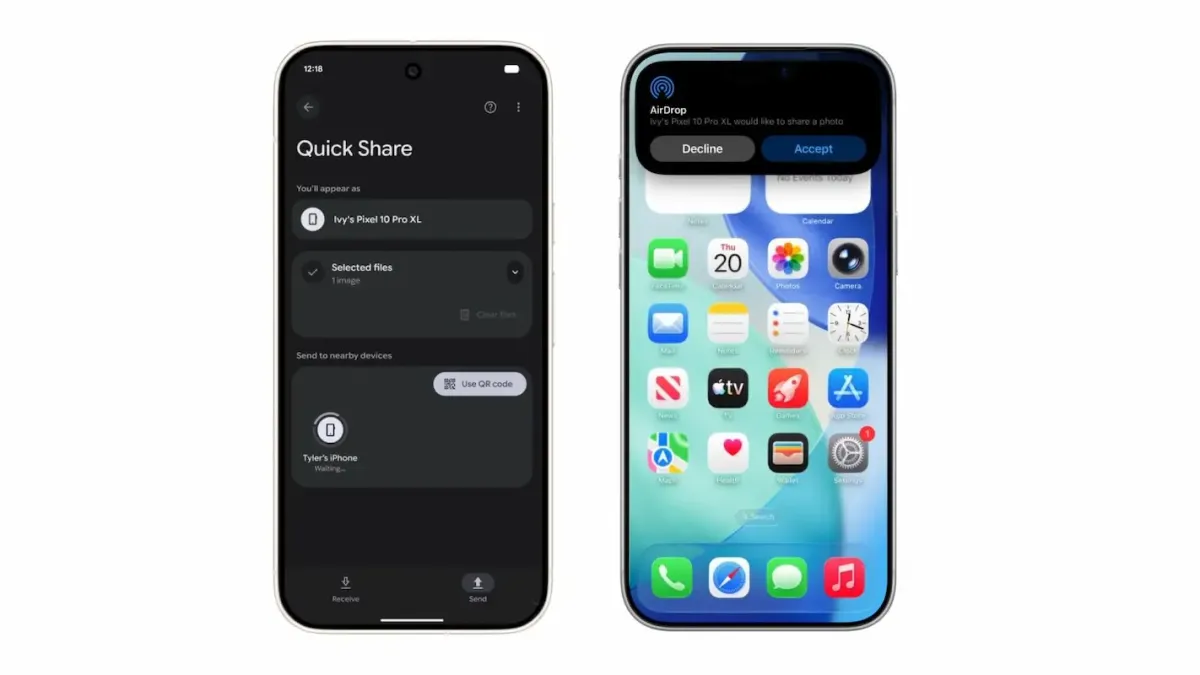
For over a decade, smartphone users have been divided into two worlds: the "Green Bubbles" (Android) and the "Blue Bubbles" (iPhone). If you wanted to send a photo from a Samsung to an iPhone, you had to use WhatsApp, Email, or messy third-party apps. The quality would drop, and it was slow.
But on November 20, 2025, everything changed.
In a surprise announcement, Google revealed that Quick Share (formerly Nearby Share) now officially supports Apple AirDrop. This is a historic moment for mobile technology. It means you can finally transfer files directly between Android and iOS without installing any extra apps.
In this article, we will explain how this new feature works, which devices support it, and if it is safe to use.
The Barrier is Broken: What Happened?
Google has developed a new protocol that allows its Quick Share system to "speak" the same language as Apple's AirDrop.
Previously, these two technologies used different frequencies and codes, so they couldn't see each other. Now, Google has updated the Pixel 10 series to recognize AirDrop signals.
- The Big News: You do not need to install a "Quick Share App" on the iPhone. The iPhone thinks it is receiving a file from another Apple device.
- The Tech: It uses a direct Peer-to-Peer connection (Wi-Fi and Bluetooth). This means it works offline and does not use the internet.
How to Use Quick Share with AirDrop
Using this feature is incredibly simple. It works almost exactly like sharing between two iPhones.
Step 1: Prepare the iPhone (Receiver)
- Open the Control Center on the iPhone.
- Tap and hold the network settings card.
- Tap on AirDrop and select "Everyone for 10 Minutes."
(Note: Currently, it does not support "Contacts Only" mode because Apple has not officially partnered with Google for this data).
Step 2: Send from Android (Sender)
- Open a photo or file on your Google Pixel 10.
- Tap the Share Icon and select Quick Share.
- Your friend's iPhone will appear in the list of nearby devices.
- Tap their name.
Step 3: Accept the File
- A notification will pop up on the iPhone screen: "Pixel 10 would like to share a photo."
- Tap Accept. The file will save directly to the Apple Photos or Files app.
Which Devices Support This?
As of late November 2025, this feature is rolling out in stages.
Supported Android Devices:
- Pixel 10
- Pixel 10 Pro & Pro XL
- Pixel 10 Pro Fold
- Google has promised to bring this to older Pixel phones and other Android brands (like Samsung and Xiaomi) in future updates.
Supported Apple Devices:
- iPhone (running iOS 17 or later)
- iPad (running iPadOS 17 or later)
- Mac computers (running macOS Sequoia or later)
Is It Safe? (Privacy & Security)
Many users are worried: "Did Google hack Apple?"
Google explains that they are using a public implementation of the AirDrop protocol. They are not "hacking" the iPhone; they are simply knocking on the door in a way the iPhone understands.
- No Cloud Servers: The file goes directly from Phone A to Phone B. It never touches a Google or Apple server.
- Encryption: The transfer is encrypted using industry-standard security.
- Consent: You cannot send a file to an iPhone unless the user explicitly clicks "Accept."
Why Did Google Do This?
Tech experts believe this is a strategic move by Google.
- User Freedom: It removes the biggest reason people stay locked in the Apple ecosystem (the "AirDrop Lock-in").
- Pressure on Apple: By making Android compatible with everything, Google makes Apple look closed-off and restrictive if they try to block it.
Conclusion
The days of asking, "Can you email that to me?" are finally over. With Google Quick Share supporting AirDrop, the wall between Android and iPhone has crumbled.
If you have a Google Pixel 10, try sending a photo to an iPhone friend today. Watch their face when it actually works!
Source -blog.google , appleinsider.com , macrumors.com
Frequently Asked Questions